Wednesday, March 18, 2015

Class 8, My Pong Game in Scratch

 This time I got to create a Pong game in Scratch. It was actually pretty cool! First I got to choose the background and what ball I wanted to use.


Then I gave the ball some movement. When the ball hits the paddle or walls its turns completely around.


Here I got to choose a paddle and give that movement too. I made it so the addle would follow the movement of the cursor. 


I also gave the ball some sound here so when it bumps something it makes a noise and it also changes color!


I added a red line at the bottom so if the balls gets past my paddle and hits it, it's game over.


I added a score in the corner so if I keep the ball from hitting the red I earn a point and if the ball gets past me I get negative points. The game was really easy, the ball never made it past me. 


If you want to try my Pong game here's the link: Click Here!

Class 8, My Animated Name in Scratch

Next we had to animate our name. I had to change the color of the letter and add a motion and/or sound to it.


I also had to draw a letter. I managed to draw a decent looking "S" I also added a fill and gradient to it. I also added a motion to it.


I added the letter"H" ass well and it got a motion where it moved up and down.

Then I added the rest of the letter of my name.


Here is the link to my animated name Scratch project: Click Here!

Class 8, My Scratch Valentine

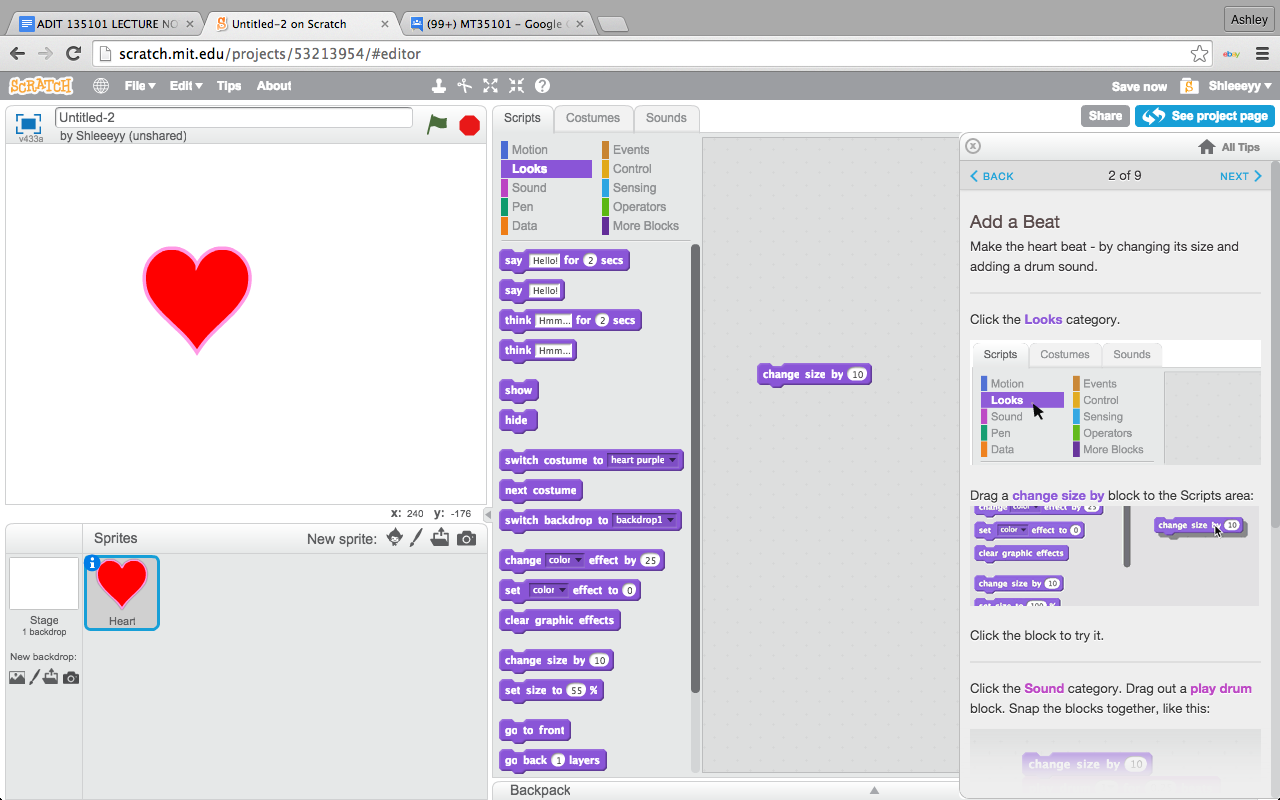
 Here's me going through the Scratch Valentine's Day tutorial! First I chose the heart and gave it a sound and a motion.


Then I added a nice background. I also made it so the background would change color while the red heart was "beating".


I also added the words "Happy Valentine's Day!" as a new sprite.


At the end of the tutorial I was able to add anything I wanted to. I added a couple of elves to the card and they also had a movement that you can't watch in the screen shot, but you can see in the steps.

Here's the link to my Scratch Valentine's Day card:  Click Here!

Class 8, Getting Started with Scratch


Here's the Scratch tutorial that I was prior to joining.


I then began to put my project together. I started with a cat and it gave me directions on how to put it together. The actions and sounds come together like a puzzle. You can also have them loop forever.


I got to choose a background.


Then I had to add a new sprite named dancing Cassie.


Here's the link to my Scratch project: http://scratch.mit.edu/projects/53210958/

Class 8, FINAL PREPARATION: Learning the basics of JavaScript.

Here we watched a bunch of tutorials about programming in JavaScript. The tutorials showed me many ways the program is used along with how to use it.  I learned how to create ellipses, rectangles and lines. As well as, how to move those shapes and lines and change their height and or width. 


I learned how to make shapes and lines using script. you have to write the name of the shape or line (ellipse, line or rectangle) follow by the location on the X,Y axis and then the height and width of the shape.


Here we were asked to create the letter "H" using rectangles. Here is how mine turned out. The step by step tutorials, as well as the little guy in the corner telling you what you were missing, were very helpful in learning how to use script.


We were then asked to create to rectangles and ellipses of different height and width and to make a line. I realized that whatever shape you wrote in first was furthest back and the last shape you put in was in the front. 


Here I tried the crazy face challenge. I had to make the mouth wider, the eyes taller and I had to move the position of the frame of the face. It was tricky at first, but I managed to figure it out.